
Extensions
odio doesn’t lock you into its built-in sources. You’re free to install and run any additional software on your Pi. The path covered here is PulseAudio output in a user systemd unit running as the odio user, which integrates cleanly with the odio UI, routing, and volume. Other paths are possible but sit outside this page’s scope.
The PulseAudio default
Section titled “The PulseAudio default”odio manages audio routing and volume through PulseAudio, and the odio UI lists every PulseAudio client with its own volume slider. Third-party software should send audio to PulseAudio so it shows up there and behaves like any other source. See the Plexamp and Squeezelite examples below for concrete setups.
MPRIS integration
Section titled “MPRIS integration”odio detects and exposes media sources through MPRIS. For third-party software to appear in the odio UI and Home Assistant, it needs to register as an MPRIS player on the session D-Bus. Whether that works depends on the software itself, some support it natively, others need a plugin or wrapper (like Kodi, MPD, or Squeezelite), and some may require specific build flags or configuration.
Example: Plexamp
Section titled “Example: Plexamp”Plexamp can run in headless mode on a Raspberry Pi, turning your odio node into a Plexamp endpoint you can cast to from any Plex client.
Requirements:
- A Plex Media Server on your network
- An active Plex Pass subscription
Installation:
A community script automates the setup — see this gist for full instructions. The short version:
- SSH into your odio node.
- Download and run the installer script with the
--userflag so Plexamp runs as a user service and can access PulseAudio:Terminal window bash plexamp.sh --user - Enter your Plex claim code and choose a player name.
- Reboot.
Plexamp will be available at http://<your-node>:32500. Use the Cast feature from Plexamp on another device to select your Pi as the playback target.
Example: Squeezelite with LMS
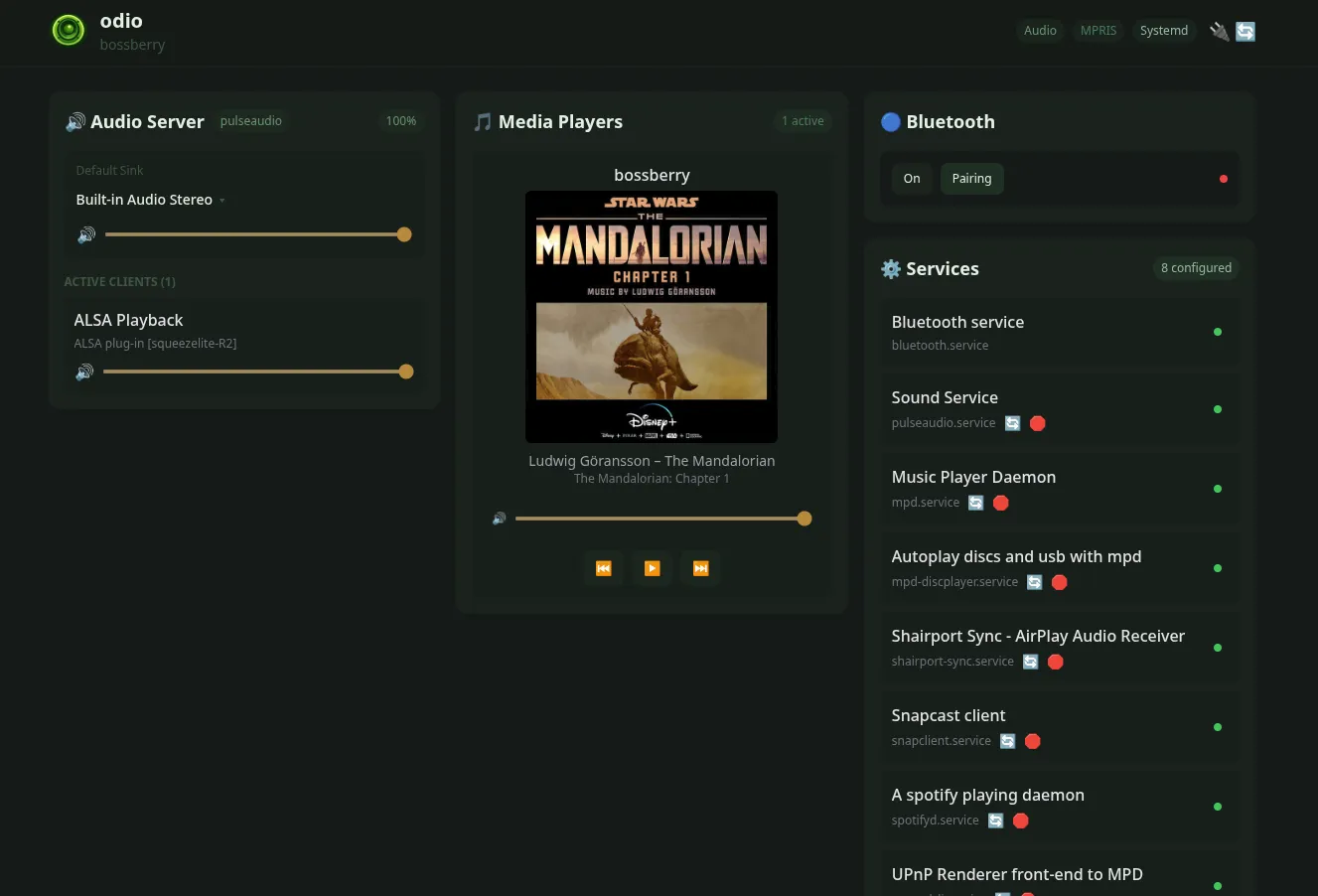
Section titled “Example: Squeezelite with LMS”Squeezelite is a software player for Logitech Media Server (LMS). On its own it has no MPRIS interface, but paired with the mprisqueeze wrapper it registers on D-Bus as an MPRIS player and shows up in the odio UI and Home Assistant like any other source, with cover art and transport controls.
Requirements:
- An LMS server on your network (running on the odio node or on a NAS, either works)
- The odio node’s user session (same user that runs odio)
Installation:
-
Install the PulseAudio build of Squeezelite from Debian:
Terminal window sudo apt install squeezelite-pulseaudioThe package provides the
/usr/bin/squeezelite-pulseaudiobinary, which outputs to PulseAudio directly. -
Install
mprisqueeze. The simplest path is via Cargo (a Rust toolchain is required):Terminal window cargo install mprisqueezeSee the mprisqueeze README for alternatives (Nix flake, build from source). The binary lands in
~/.cargo/bin/mprisqueeze. -
Create a user systemd unit at
~/.config/systemd/user/mprisqueeze.service, adapted from the example in the mprisqueeze README:[Unit]Description=mprisqueeze[Service]ExecStart=%h/.cargo/bin/mprisqueeze -p my-player -H LMSSERVERIP -- squeezelite-pulseaudio -n {name} -s {server}Restart=alwaysRestartSec=3Type=simple[Install]WantedBy=default.targetReplace
my-player(the name shown in LMS) andLMSSERVERIP. Drop-H LMSSERVERIPentirely to let mprisqueeze auto-discover the server on the LAN, as documented in the README. -
Enable and start the service:
Terminal window systemctl --user daemon-reloadsystemctl --user enable --now mprisqueeze.service
Squeezelite registers as an MPRIS player on the user session bus, and the odio UI picks it up automatically.
Other ideas
Section titled “Other ideas”Anything that can run on a Pi in user session and output to PulseAudio is fair game. Some possibilities:
- Jellyfin — self-hosted media server with MPV Shim for headless audio playback
Beyond PulseAudio
Section titled “Beyond PulseAudio”Some users run audio software directly on ALSA for specific needs like high sample rates or bit-perfect paths to a DAC, bypassing the PulseAudio stack odio manages. That’s outside the scope of this documentation, odio’s routing and volume controls only apply to PulseAudio clients, so a raw-ALSA stream won’t be affected by them.
For a concrete example, see @sm0kingm4n’s write-up on issue #38, which uses squeezelite-R2 for server-side upsampling up to 768 kHz via LMS’s C-3PO plugin.