
The architecture and design behind odio
User session
Section titled “User session”odio runs in your systemd user session. Not as root — go-odio-api actually refuses to run as root. This is the architectural foundation, not an implementation detail.
Because odio lives in your user session, it has natural access to the entire multimedia stack: the D-Bus session bus, PulseAudio, MPRIS, logind, BlueZ user-level profiles. No privilege escalation, no setuid tricks. The security model is the standard UNIX model.
Every audio service (MPD, shairport-sync, spotifyd, upmpdcli, Snapclient) runs as a systemd user unit. They can be started, stopped, and monitored through the API: no SSH or reboot needed.
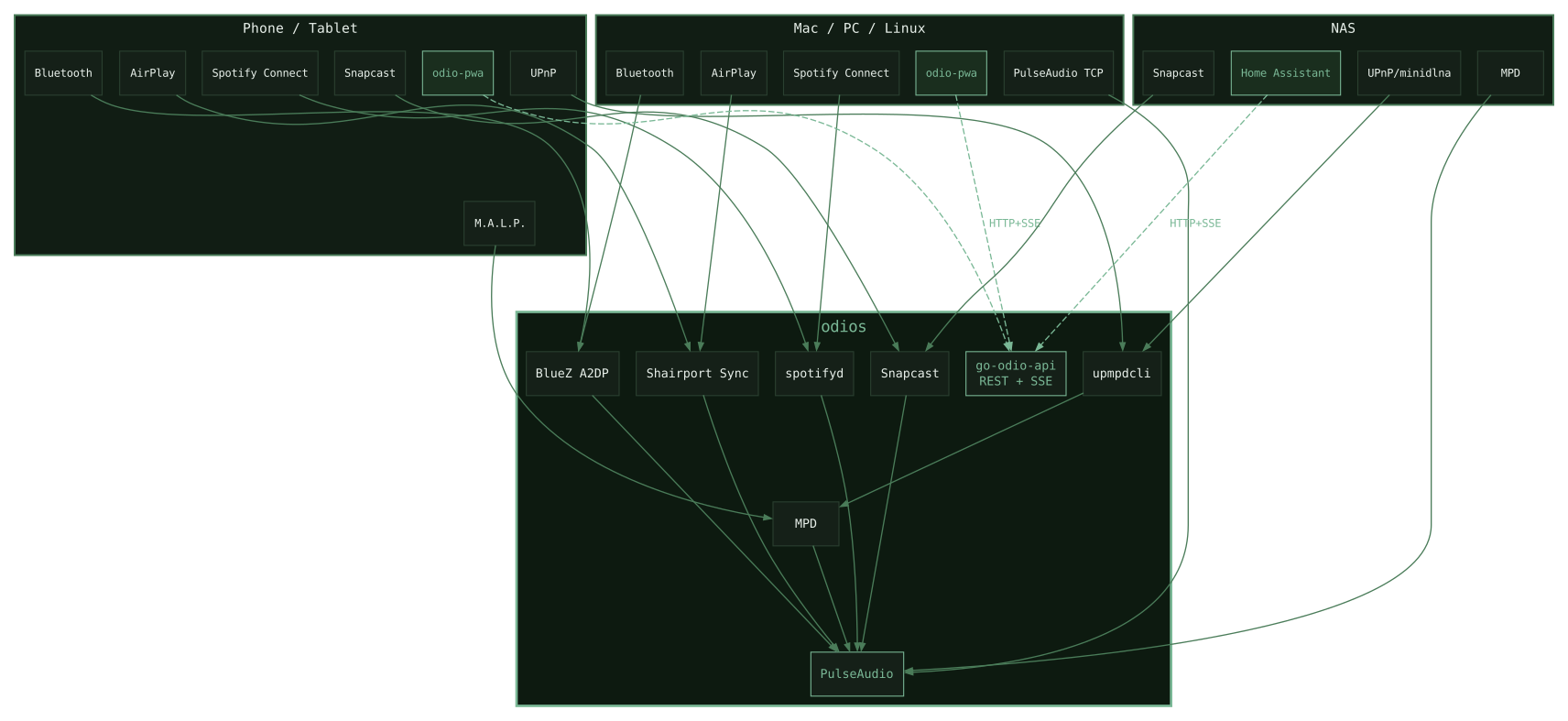
Why PulseAudio, not ALSA
Section titled “Why PulseAudio, not ALSA”Most audio appliances use ALSA directly. ALSA gives exclusive access to the sound card, one process at a time. When you try to run multiple audio sources (Bluetooth, Spotify, MPD, AirPlay), they fight for control, causing cracks, glitches, and lag.
PulseAudio sits on top of ALSA and solves this at the root. It’s a sound server that mixes all audio sources in the same session. There is no source switching in odio because there is no exclusive lock. MPD, shairport-sync, Snapclient, Bluetooth: all live in the same PulseAudio mixer at once. You don’t select a source. You just play.
PulseAudio also enables features that ALSA alone cannot provide: per-application volume control, Bluetooth audio (A2DP), network audio (TCP sink with Zeroconf), and dynamic output routing.
Some audio distributions stick to ALSA for “audiophile” reasons. I chose PulseAudio for the comfort it brings: seamless mixing, per-app volume, and above all PulseAudio TCP, which lets any desktop on your network use the node as an audio output. I don’t hear the difference with ALSA, but I definitely feel the usability difference.
When you commit to PulseAudio, every audio application must output to it directly. MPD, shairport-sync, spotifyd — all configured with PulseAudio as their audio backend.
Equalizer and volume normalization
Section titled “Equalizer and volume normalization”odio ships without equalizer or volume normalization, I don’t use them and prefer a clean, unprocessed signal. If there is demand and concrete proposals, this could be considered (open an issue). You can also set up your own as an extension
Mono output
Section titled “Mono output”odio outputs stereo. For a single speaker, PulseAudio’s module-remap-sink mixes both channels down into a mono sink placed on top of your DAC. To try it, from an SSH session as the odio user:
pactl load-module module-remap-sink master=@DEFAULT_SINK@ sink_name=mono channels=1 channel_map=mono sink_properties=device.description=Monopactl set-default-sink monoThe Mono sink also shows up under Audio Server → Default Sink in the embedded web UI, where you can switch between it and the stereo output like any other sink. The module does not survive a reboot. A small script and a user unit that load it at boot, and restore stereo when stopped, are on odios#86, opened by @langmario for a DigiAMP+ driving one speaker, which also tracks a mono/stereo toggle in odio-api.
PipeWire
Section titled “PipeWire”PipeWire is the future of Linux audio. It provides lower latency, better device management, and full PulseAudio compatibility via pipewire-pulse. From the outside, nothing changes, all existing clients keep working.
odio currently runs PulseAudio, backed by six years of production use. PipeWire will arrive as an option in the future.
go-odio-api
Section titled “go-odio-api”go-odio-api is what makes the stack programmable. A REST API written in Go that bridges every component into a single coherent interface: playback, volume, Bluetooth pairing, power management, output routing — all exposed as HTTP endpoints, with SSE for real-time updates.
The architecture is event-driven. No polling, no busy loops. go-odio-api listens to D-Bus signals, MPRIS events, and PulseAudio state changes, and reacts. A cache layer prevents redundant system access. On a Pi B+, idle cost is near zero.
Every audio source (Spotify, Bluetooth, AirPlay, MPD, …) exposes itself as an MPRIS player on D-Bus. go-odio-api discovers them all automatically and provides a unified control surface — regardless of the source.
go-odio-api never talks to any media player directly, it only speaks MPRIS over D-Bus. That’s what keeps the backend source-agnostic, any MPRIS-compliant player shows up with zero integration work. The flip side is that odio’s control surface for a given player is only as good as that player’s MPRIS implementation, transport controls, metadata, cover art, and position reporting all depend on what the player actually exposes. Spotify Connect and shairport-sync are solid, MPD needs mpd2mpris to report cover art correctly, Snapclient needed a dedicated wrapper, some players expose barely anything. When controls look patchy for a given source, it’s almost always the player’s MPRIS layer, not odio.
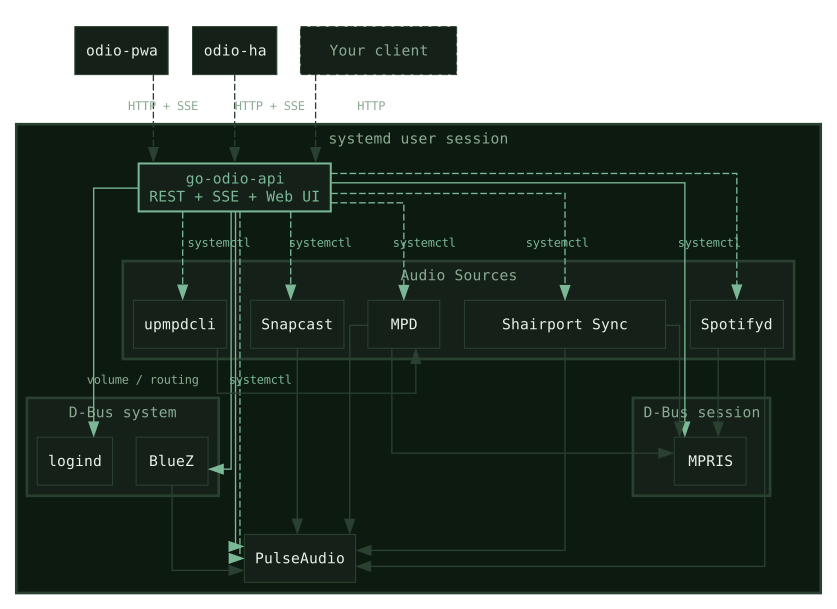
The binary ships with an embedded web UI. The API and the interface are the same process. But the API is the product. The embedded UI is one client among many. See the full API documentation.
Configuration philosophy
Section titled “Configuration philosophy”Two worlds bracket this space. Commercial streamers are closed appliances: nothing to configure, nothing you can configure, and nothing you can swap out once the vendor moves on. On the Raspberry Pi side, distributions like Volumio and Moode go the other way, exposing a lot of the stack through a UI, useful or not, but making anything beyond that UI awkward to reach over SSH.
odio picks a different middle: a minimal base, tuned to run well on a Pi B+, with software and defaults chosen to cover the common cases with a deliberately small settings page. It holds what genuinely needs tweaking on a node, upgrades, which components run, and the DAC overlay, and is meant to grow from there. Everything else, overclocking included, is left to you over SSH, where the standard Linux tools already work the way you’d expect.
Whether that balance is right for every user isn’t something I’d claim as settled. What gets pulled into odios versus left on the command line will shift with what the community actually wants automated.
If you disagree with a software choice or configuration default, or think there’s a better option, bring it to discussions and argue the case. That’s how these calls get revisited.
The ecosystem
Section titled “The ecosystem”| Repository | Language | What it does |
|---|---|---|
| go-odio-api | Go | REST API + embedded web UI |
| odios | Ansible | Installer and service orchestrator |
| odioctl | Go | Settings page and CLI |
| odio-pwa | Svelte | Web application for multi-node management |
| odio-ha | Python | Home Assistant integration |
| pyodio | Python | Async Python client library |
| go-mpd-discplayer | Go | CD and USB auto-play daemon |
| go-disc-cuer | Go | CUE sheet library (GnuDB, MusicBrainz) |
| go-odio-notify | Go | Audio notification library (PulseAudio) |
| mpd2mpris | Python | Async MPRIS bridge for MPD with CUE cover-art support |
| snapclientmpris | Python | MPRIS bridge for Snapcast client with multi-room controls |
| odio-framebuffer-ui | C++ | Framebuffer kiosk browser for a local screen |
| odio-apt-repo | GitHub Actions | apt repository, CI-managed |
For the full architecture deep-dive, see How odio works.