
How to upgrade odio and check for releases
From Home Assistant and the web UI
Section titled “From Home Assistant and the web UI”The simplest way to check for and apply upgrades is from Home Assistant or the embedded web UI, no SSH required. Both are backed by go-odio-api (v0.15.1), which exposes the odio-check-upgrade and odio-upgrade units, and /var/cache/odio/upgrades.json, over its API. A full odios install wires this up automatically since 2026.6.0b2.
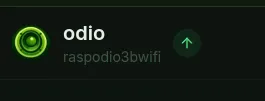
In the embedded web UI, a status badge sits in the header:
- a check mark when the node is up to date, click to re-check;
- an up arrow when an upgrade is available, click to start it (with a confirmation);
- a progress ring while a run is in flight;
- a red alert badge when the last run failed, hover to reveal the up arrow and retry; it persists until the next run.
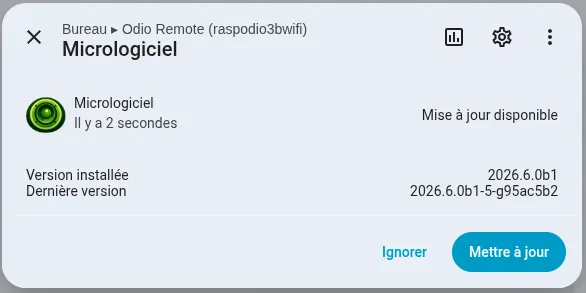
In Home Assistant, the node carries a native Firmware update entity (update.odio_remote_<hostname>_firmware). It tracks the installed and latest versions, shows an Install button when the server allows starting an upgrade, and reports live progress during a run. Detection is server-driven over SSE, so HA never polls.
Both reflect whatever the node’s detector reports and trigger the same units, see the upgrade API for the contract behind them.
Since 2026.9.0b1, the node’s settings page on port 8021 shows the same check result, with the roles that would move, and an Apply now button that starts the same unit. It is also where components get enabled or disabled ahead of a run, see below.
Check for upgrades from the command line
Section titled “Check for upgrades from the command line”Each node shows its update status in the MOTD when you SSH in:
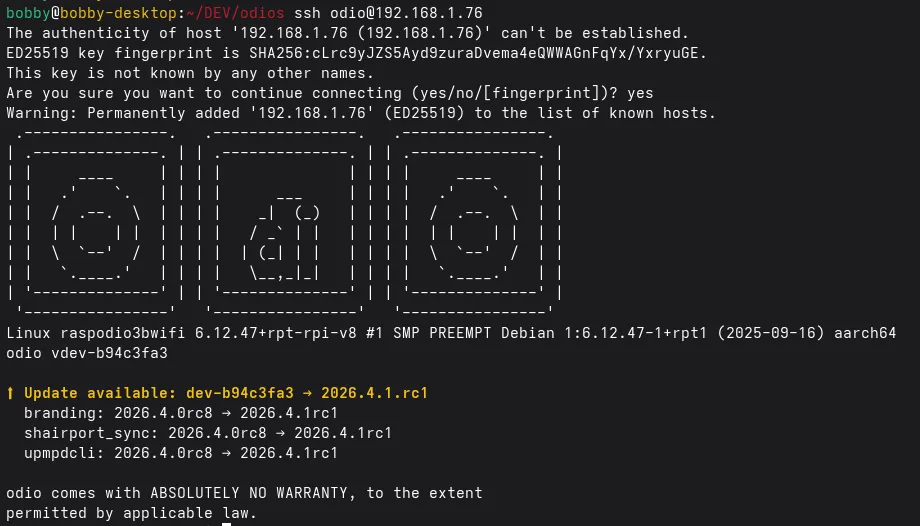
The notice lists the overall version bump and the roles whose version actually changed. If nothing changed, the notice is absent.
A systemd user timer (odio-check-upgrade.timer) reruns the check daily. Run it on demand to see the result on stdout:
odio@raspodio:~ $ odioctl upgrade checkUpgrades available: 2026.7.0rc2 → 2026.9.0b1 upgrade: 2026.7.0rc2 → 2026.9.0b1The check is the odioctl binary since 2026.9.0b1; earlier releases shipped it as the odio-upgrade check script.
Or trigger the user unit, with the result landing in the user journal:
systemctl --user start odio-check-upgrade.serviceApply an upgrade
Section titled “Apply an upgrade”Trigger the systemd user unit:
systemctl --user start odio-upgrade.serviceIt re-runs the installer with the feature selection from the previous run. Since 2026.5.0b1, it only re-runs the roles that actually changed in the target release (smart upgrade), bringing most upgrades down to a handful of roles.
For flags, call odioctl directly. Applying needs root, which the odioctl group gets without a password:
sudo odioctl upgrade apply # same as the unitsudo odioctl upgrade apply --version 2026.9.0b1 # pin a release tagsudo odioctl upgrade apply --dry-run --force # print the invocation, no changessudo odioctl upgrade apply --reinstall # re-run every role, not only the ones that movedOpen PRs are published as pr-<N> pre-releases (see CI/CD), so testing a PR before merge is the same call. To keep a node on that pre-release for the daily check and the settings page too, set ODIOCTL_ODIOS_VERSION=pr-84 in /etc/default/odioctl:
sudo odioctl upgrade apply --version pr-84The installer is idempotent and safe to re-run. When a config file has been locally modified, it creates a <config>.bak before applying changes; if the file ends up identical, no backup is kept (Bluetooth, MPD, mpd-discplayer, odio-api, PipeWire, shairport-sync, spotifyd, upmpdcli).
Bootstrap (cold install)
Section titled “Bootstrap (cold install)”Fresh install:
curl -fsSL https://odio.love/install | bashPin a release tag:
curl -fsSL https://github.com/b0bbywan/odios/releases/download/2026.5.0b1/install.sh | ODIOS_VERSION=2026.5.0b1 bashA node installed before 2026.9.0b1 still carries the odio-upgrade script. Run it once, odio-upgrade apply or the unit above: that run installs the odioctl package, moves the units and sudoers over, and removes the script. From then on, everything on this page applies.
A node installed before 2026.4.2b1 has no helper at all. Releases up to 2026.7.0rc2 ship it as a standalone asset, so it can run before being installed and take the same migration path:
curl -fsSL https://github.com/b0bbywan/odios/releases/download/2026.7.0rc2/odio_upgrade.py -o /tmp/odio-upgradechmod +x /tmp/odio-upgrade/tmp/odio-upgradeOpt out of a role or feature
Section titled “Opt out of a role or feature”Upgrades are opt-out: only entries listed in state.json map to INSTALL_*=N. Everything else, including roles or features added in a later release, is installed.
Toggle components from the settings page or the command line, for example to keep branding and upnpwebradios off:
odioctl components listodioctl components disable brandingodioctl components disable upnpwebradiosDisabling keeps the component installed but stops updating it, nothing is removed. enable opts back in. Either way the change only takes effect on the next run:
sudo odioctl upgrade apply --dry-run --force # print the derived INSTALL_* flagssudo odioctl upgrade applyUnder the hood, the toggle adds the entry to the matching _excluded list in /var/lib/odio/state.json, which you can still edit by hand:
"roles_excluded": [ "snapclient", "spotifyd" "snapclient", "spotifyd", "branding"],"features_excluded": [ "tidal" "tidal", "upnpwebradios"]State files behind the upgrade flow
Three files back the detection and upgrade flow:
-
Local state —
/var/lib/odio/state.json, written by the installer after each successful run and read byodioctl upgrade apply. Tracks the odios version, install mode, target user, per-role versions, opt-in features, explicit opt-outs, and arelease_historyof the last odios versions installed on this node. The file is0660 root:odiosince 2026.9.0b1, so the settings page can edit it as the odio user:{"features": ["tidal","qobuz","upnpwebradios","mympd"],"features_excluded": [],"install_mode": "live","odios": "2026.5.0b1","release_history": ["2026.4.2b2","2026.5.0b1"],"roles": {"bluetooth": "2026.5.0b1","branding": "2026.5.0b1","common": "2026.5.0b1","mpd": "2026.5.0b1","mpd_discplayer": "2026.5.0b1","odio_api": "2026.5.0b1","pulseaudio": "2026.4.2b1","shairport_sync": "2026.4.1rc1","snapclient": "2026.4.0rc5","spotifyd": "2026.5.0b1","upgrade": "2026.5.0b1","upmpdcli": "2026.4.2b2"},"roles_excluded": [],"target_user": "odio"} -
Published manifest — odio.love/manifest.json, generated by CI on each release with the same shape. Each role version is the last odios release that touched that role.
-
Check result —
/var/cache/odio/upgrades.json, written byodioctl upgrade check(the daily timer’s job, and again after every component toggle) and read by the MOTD and odio-api:{"current": "2026.4.2b2","latest": "2026.4.2b2","upgrade_available": false,"roles": [],"manifest": {"odios": "2026.4.2b2","roles": {"bluetooth": "2026.4.0rc5","branding": "2026.4.2b1","common": "2026.4.2b2","mpd": "2026.4.2b2","mpd_discplayer": "2026.4.2b1","odio_api": "2026.4.2b2","pipewire": "2026.4.0rc6","pulseaudio": "2026.4.2b1","shairport_sync": "2026.4.1rc1","snapclient": "2026.4.0rc5","spotifyd": "2026.4.2b1","upgrade": "2026.4.2b2","upmpdcli": "2026.4.2b2"}},"checked_at": "2026-05-07T19:32:34Z"}